TL;DR: Application control software decides which executables, scripts and libraries are allowed to run. Airlock Digital is best for Deny by Default across IT and OT, ThreatLocker fast rollouts, Carbon Black App Control locked-down servers, Microsoft App Control native Windows estates.
Application control software manages which applications and executable files can run in an organization's environment. It applies policies based on factors such as file identity, publisher, path, digital signature, hash, or application reputation. Depending on the policy, software can be allowed, blocked, or restricted. When purchasing application control software, prioritize: allowlisting/blocklisting capabilities, centralized policy management, and visibility into runtime execution to effectively block unauthorized software and support Zero Trust security models.
Key evaluation criteria
Use these five dimensions to compare products against each other and against your own environment:
Solutions covered in this guide:
In this article:
Application control software helps organizations understand, limit, and manage what runs across endpoints and servers. By combining execution visibility with enforcement policies, it supports stronger security, better software governance, and reduced risk from unauthorized or vulnerable applications.
Related content: Read our article about ransomware protection.
Each criterion below covers a different part of the buying decision. Work through them in order, since the policy model shapes everything that follows.
The policy model determines what a rule can actually express. Products differ in whether trust attaches to a file hash, a signing certificate, a publisher, a directory path, the process that launched the file, or the process that installed it. Hash-only models are precise but change with every software release. Publisher and installer-based models survive updates but grant broader trust, so the range of available attributes decides how tightly policy can be scoped without becoming unmanageable.
Evaluation criteria:
This is where most application control deployments generate friction. Legitimate updates change file hashes, and a policy that has not accounted for that will block software the business depends on. The mechanisms that address this are trusted installers, publisher trust, reputation services and time-bound overrides. Alongside them, the exception request path matters: if a user waiting on an approval is blocked for a day, the control gets switched off.
Evaluation criteria:
Enforcing a Deny by Default policy without first observing what runs in the environment is the fastest way to break production. Audit or learning modes record what a policy would have blocked, so gaps can be closed before enforcement begins. The quality of this phase, and how long it takes to build a working baseline, is a fair proxy for how much effort ongoing operation will require.
Evaluation criteria:
Coverage gaps are common and easy to miss during evaluation. Some products are Windows-first with reduced macOS and Linux functionality; others are built around servers and fixed-function devices rather than user desktops. Legacy and end-of-life operating systems, OT networks and air-gapped environments are frequently the systems that most need application control, and also the ones least likely to be supported.
Evaluation criteria:
Application control generates a record of everything that ran and everything that was stopped. That record supports software inventory, incident investigation and policy refinement, and it is often the artefact an auditor asks for against frameworks such as the ASD Essential Eight, NIST or CMMC. Reporting depth varies widely, and is a common source of complaints even in otherwise well-regarded products.
Evaluation criteria:
New to this control? Start with our primer on application allowlisting.
The table summarizes how each solution measures up against the five criteria. Each is examined in detail below.
| Category | Solution | How It Meets the Criteria |
|---|---|---|
| Dedicated application control solutions | Airlock Digital | Trust defined at file, path, publisher or parent process, with trusted installer automation, OTP overrides and execution logging across Windows, macOS, Linux, OT and legacy systems. |
| Dedicated application control solutions | ThreatLocker | Deny by Default allowlisting with pre-built application definitions, user-initiated approval requests, policy expiry and peer usage data to inform decisions. |
| Dedicated application control solutions | Carbon Black App Control | Positive security model with trusted publishers, directories and reputation-driven approval, plus file integrity, memory and registry controls for servers and EOL systems. |
| Dedicated application control solutions | Windows Defender Application Control (WDAC) | Kernel-level, Deny by Default code integrity enforcement using signer, hash, path, ISG reputation, and managed-installer rules; native to Windows, deployed via Intune, Group Policy, or SCCM. |
| Dedicated application control solutions | Trellix Application and Change Control | Execution rules combining file, process, parent process, command line and username, paired with change control and ePolicy Orchestrator reporting. |
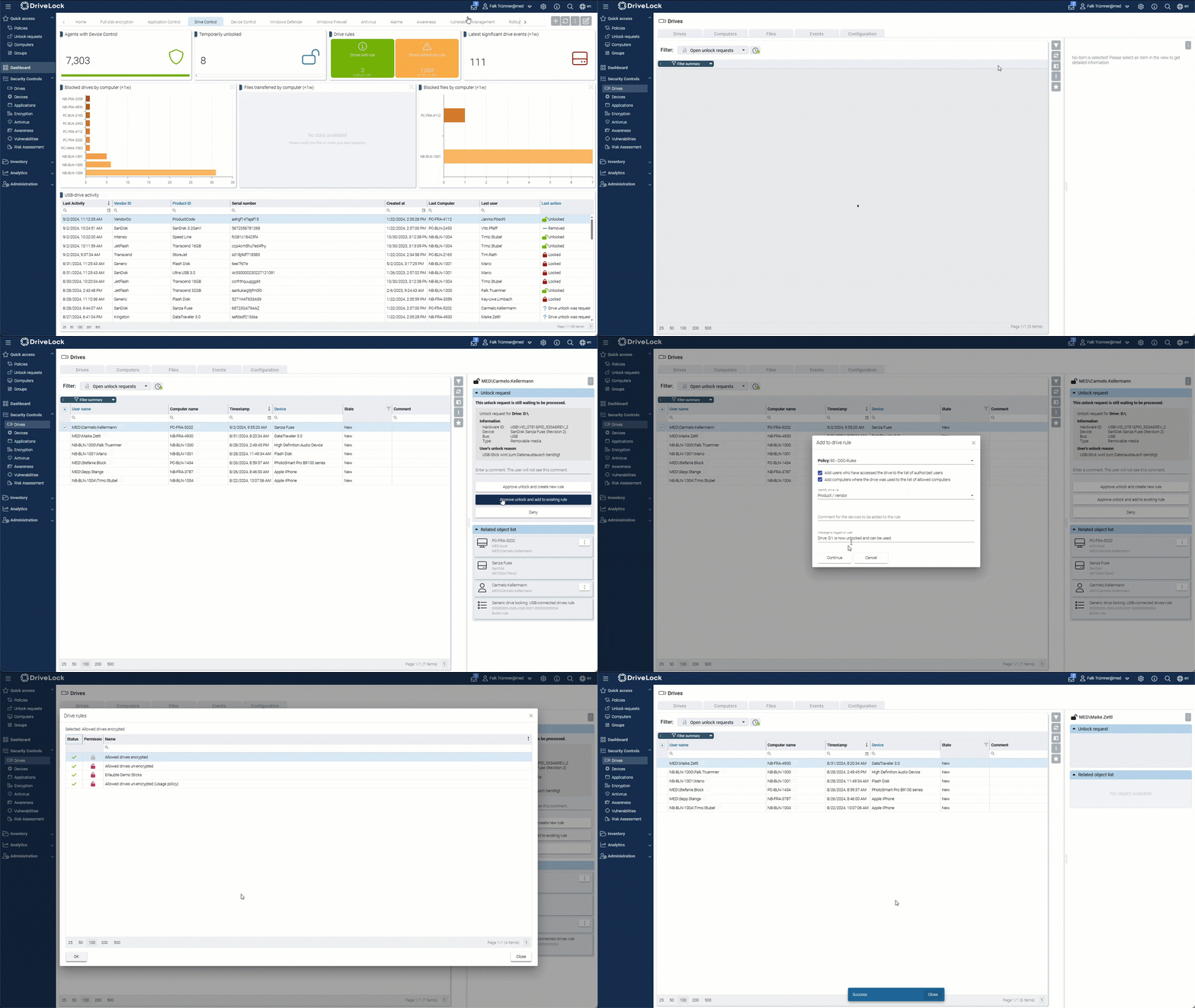
| Dedicated application control solutions | DriveLock Application Control | Deny by Default allowlisting paired with Application Behavior Control, device control, and encryption, certified to Common Criteria EAL3+, hosted cloud or on-premises. |
| Application control within endpoint management and privilege solutions | Microsoft App Control for Business | Native Windows enforcement using certificate, metadata, reputation, managed installer and path rules, deployed through Intune, Configuration Manager or Group Policy. |
| Application control within endpoint management and privilege solutions | Ivanti Application Control | Dynamic allowed and denied lists with trusted ownership, digital signature checks and helpdesk-integrated change requests, focused on Windows desktops and servers. |
| Application control within endpoint management and privilege solutions | BeyondTrust Endpoint Privilege Management | Application control combined with Least Privilege and just-in-time elevation across Windows, macOS and Linux, with QuickStart templates and a central audit trail. |
| Application control within endpoint management and privilege solutions | ManageEngine Application Control Plus | Allowlisting and blocklisting with a discover, audit and enforce workflow and privilege elevation, with just-in-time access delivered through an Endpoint Central add-on. |
| Application control within endpoint management and privilege solutions | Delinea Privilege Manager | Least Privilege elevation combined with policy-based application control (sandboxing, UAC override, child process control) and behavior analytics across Windows and Mac. |
How we selected these solutions: We shortlisted application control software based on execution control for applications, scripts and libraries, trust and exception management, rollout and enforcement modes, operating system and environment coverage, and reporting for audit and compliance.
Best for: Deny by Default execution control across IT, OT and legacy estates
Strengths: Granular trust rules, OTP exceptions and trusted installer workflows
Things to consider: Allowlists need upkeep as vendors ship new application versions unless identified as a Trusted Installer
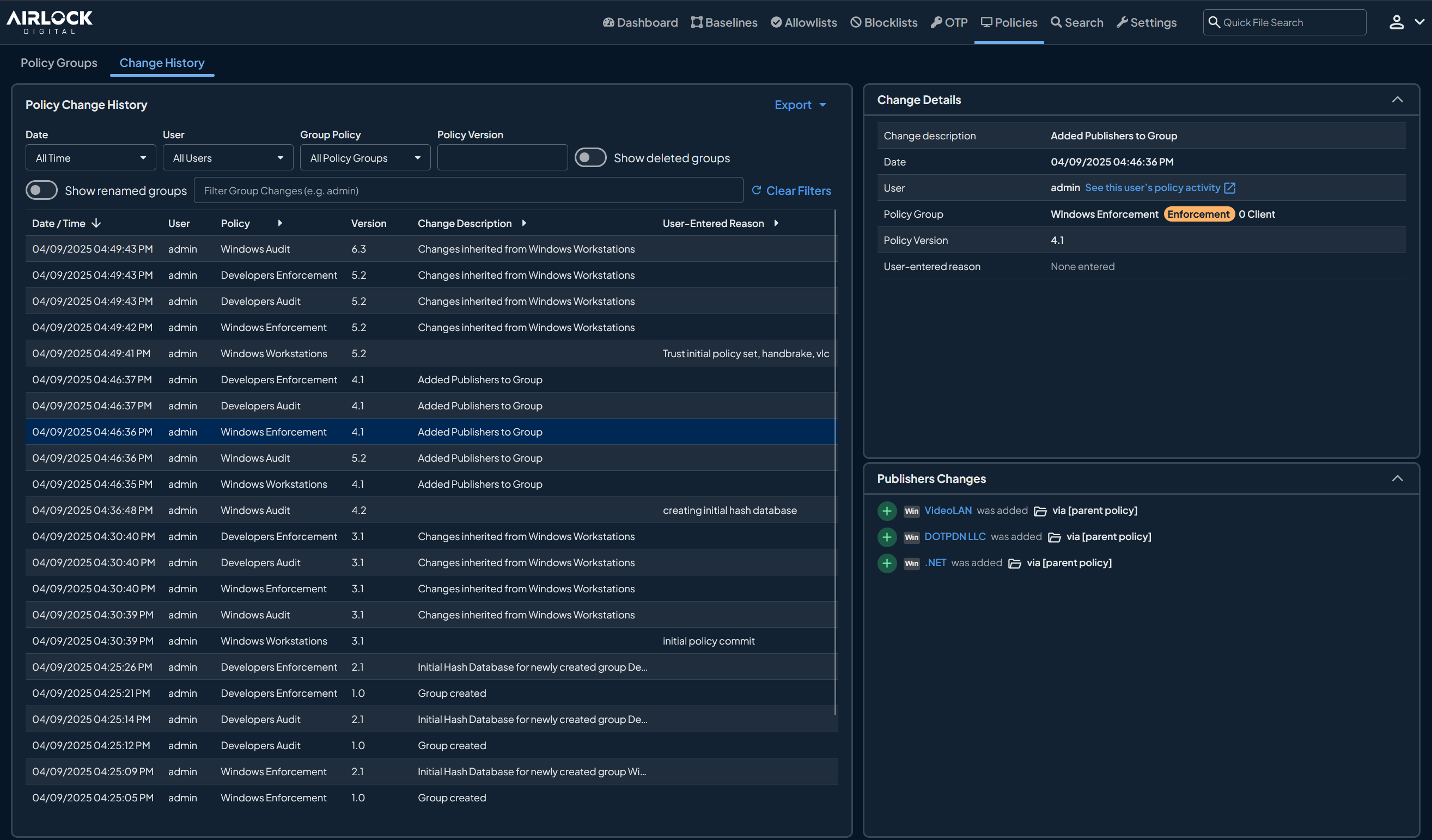
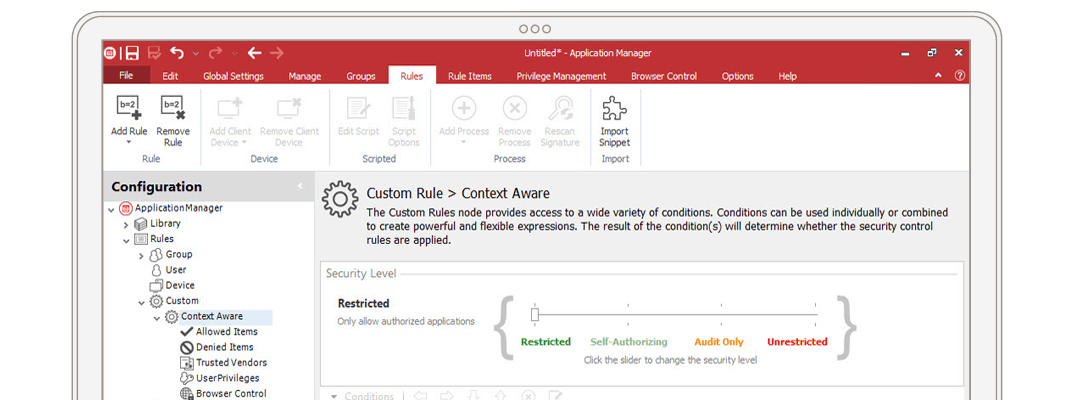
Airlock Digital enforces a Deny by Default model in which only trusted applications, scripts and processes are permitted to execute. Trusted applications are defined at the file, path, publisher or parent process level, and blocklisting can be applied alongside allowlisting in the same environment.
Exception handling uses rule-based overrides and One-Time Passwords, which allow temporary execution of untrusted applications on a device without altering the wider policy. Policies are deployed consistently across IT, OT and hybrid environments, including legacy systems, and VirusTotal file intelligence is integrated into the console to inform allowlisting decisions.
Key features include:
| Criterion | Solution Fit | Key Considerations |
|---|---|---|
| Policy model and trust definition | Trust defined at file, path, publisher or parent process level, covering executables, libraries, installers and scripts, with blocklisting available alongside allowlisting. | Policy creation in large or highly dynamic environments benefits from planning; reviewers note workflows need careful tuning during initial rollout. |
| Software updates and exception handling | Trusted Installer auto-allowlists software deployed via SCCM/MECM, Intune, Jamf and BigFix; rule-based overrides and OTPs handle one-off exceptions. | Reviewers note that keeping allowlists current still requires attention as vendors release new versions across a large endpoint count. |
| Rollout and enforcement modes | Real-time execution data across the estate supports staged policy development before enforcement is applied. | Some reviewers found the agent release cadence frequent for tightly change-managed environments. |
| Platform and environment coverage | Windows, macOS and Linux, including legacy operating systems and OT environments; available on-premises, in the cloud or as a managed hosted service. | Cross-platform behavior varies by feature, so confirm parity for the specific controls you plan to enforce. |
| Visibility, reporting and compliance evidence | Comprehensive audit trails, application-level and component-level context, SIEM integration and mapping to Essential Eight, NIST and CMMC. | Reporting and analytics continue to expand release by release; some reviewers would like richer analytics. |
Source: Airlock Digital
Best for: Fast Deny by Default rollouts with vendor assisted app approvals
Strengths: Pre-built app definitions, one click approvals, policy expiry
Things to consider: Approval prompts and policy fields can feel dense at first
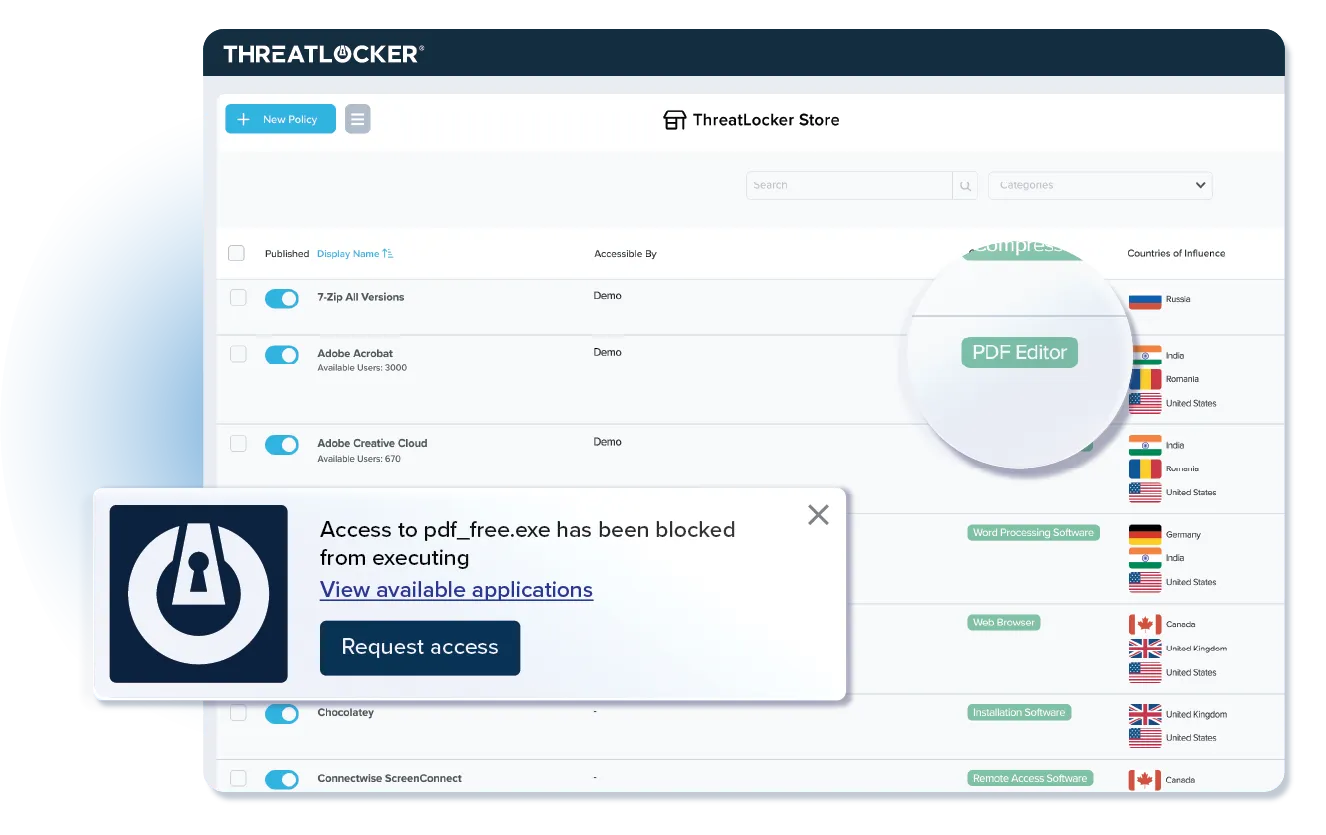
ThreatLocker applies Deny by Default allowlisting so that only approved software runs, with unapproved applications, scripts and libraries blocked. After the agent is deployed it catalogs the applications and dependencies present in the environment, drawing on more than 15,000 pre-built application definitions to generate policy suggestions rather than requiring lists to be built by hand.
Approvals are handled either internally or by the vendor. Users request access to a blocked application through a popup, and IT can approve it or route it to the ThreatLocker Cyber Hero team. Policies can be set to expire, so a tool can be permitted for a defined window rather than indefinitely.
Key features include:
| Criterion | Solution Fit | Key Considerations |
|---|---|---|
| Policy model and trust definition | Binary allowlist model covering applications, scripts and libraries, with additional controls such as ringfencing available on the wider platform. | Reviewers describe the number of fields when adding an application to the allowlist as overwhelming on first use. |
| Software updates and exception handling | Pre-built definitions and policy suggestions reduce manual list building; user popups route requests to IT or the Cyber Hero team, with time-bound policies. | Reviewers report the approval popup can be missed by users and the request process confuses some staff without briefing. |
| Rollout and enforcement modes | Automatic cataloguing of installed applications produces a starting policy set, supporting a fast path to enforcement. | Reviewers describe the initial setup as somewhat confusing and note the learning mode could be more streamlined. |
| Platform and environment coverage | Endpoint agent-based deployment across the managed estate, with cloud and network access controls available in the same platform. | Reviewers ask for better integration for browsers and mobile devices, and deeper granularity in cloud storage platforms. |
| Visibility, reporting and compliance evidence | Full logging of application, dependency and update activity, with mapping to common compliance frameworks. | Reviewers cite policy management, reporting dashboards and notifications as areas for improvement, and some find the cost high. |
Source: ThreatLocker
Best for: Locking down servers, fixed function devices and EOL systems
Strengths: Positive security model with FIM, memory and registry control
Things to consider: Complex setup and reported false blocks on signed software
Carbon Black App Control applies a positive security model in which software must carry a verified level of trust before it is allowed to run, and unknown software is untrusted by default. It is aimed at locking down servers and critical systems on-premises, in private clouds and in public clouds, and at preventing unauthorized changes to system configurations.
Rather than relying on manually maintained hash lists, approval is automated through trusted directories, cloud reputation data, trusted publishers and custom rules. The product extends past execution control into file integrity, device, memory and registry protection, which is why it is frequently deployed on fixed-function systems and end-of-life operating systems.
Key features include:
| Criterion | Solution Fit | Key Considerations |
|---|---|---|
| Policy model and trust definition | Positive security model combining allowlisting and denylisting with rules by path, process, user and publisher, plus memory, registry and file integrity controls. | Reviewers note the overhead of maintaining application lists at scale. |
| Software updates and exception handling | Trusted publishers, trusted directories, cloud reputation and automated file analysis approve clean software without manual hash maintenance. | Reviewers report false positives, including signed software such as Adobe and Chrome being blocked in large environments due to certificate validation issues. |
| Rollout and enforcement modes | Trust-based approval mechanisms are designed to establish a positive security posture without building lists by hand first. | Reviewers describe the initial setup as very complex and say it typically requires guidance from the support team. |
| Platform and environment coverage | Sensors for Windows including XP, Server, Embedded/POS and ARM64, macOS and Linux (RHEL, Oracle Linux), deployed on-premises, in AWS, Azure or private cloud, including air-gapped systems. | Reviewers say macOS lacks full feature parity with Windows. |
| Visibility, reporting and compliance evidence | Continuous recording of endpoint and server activity, application catalog inventory, CPE data and open APIs for SIEM and third-party integration. | Reviewers consistently describe reporting as an area needing improvement, and several note the product is expensive. |
Source: Carbon Black
Best for: Kernel-level code integrity enforcement built into Windows at no extra cost
Strengths: Pre-execution enforcement, native OS integration, reputation-based trust via ISG
Things to consider: Policy authoring complexity and no dedicated vendor support channel
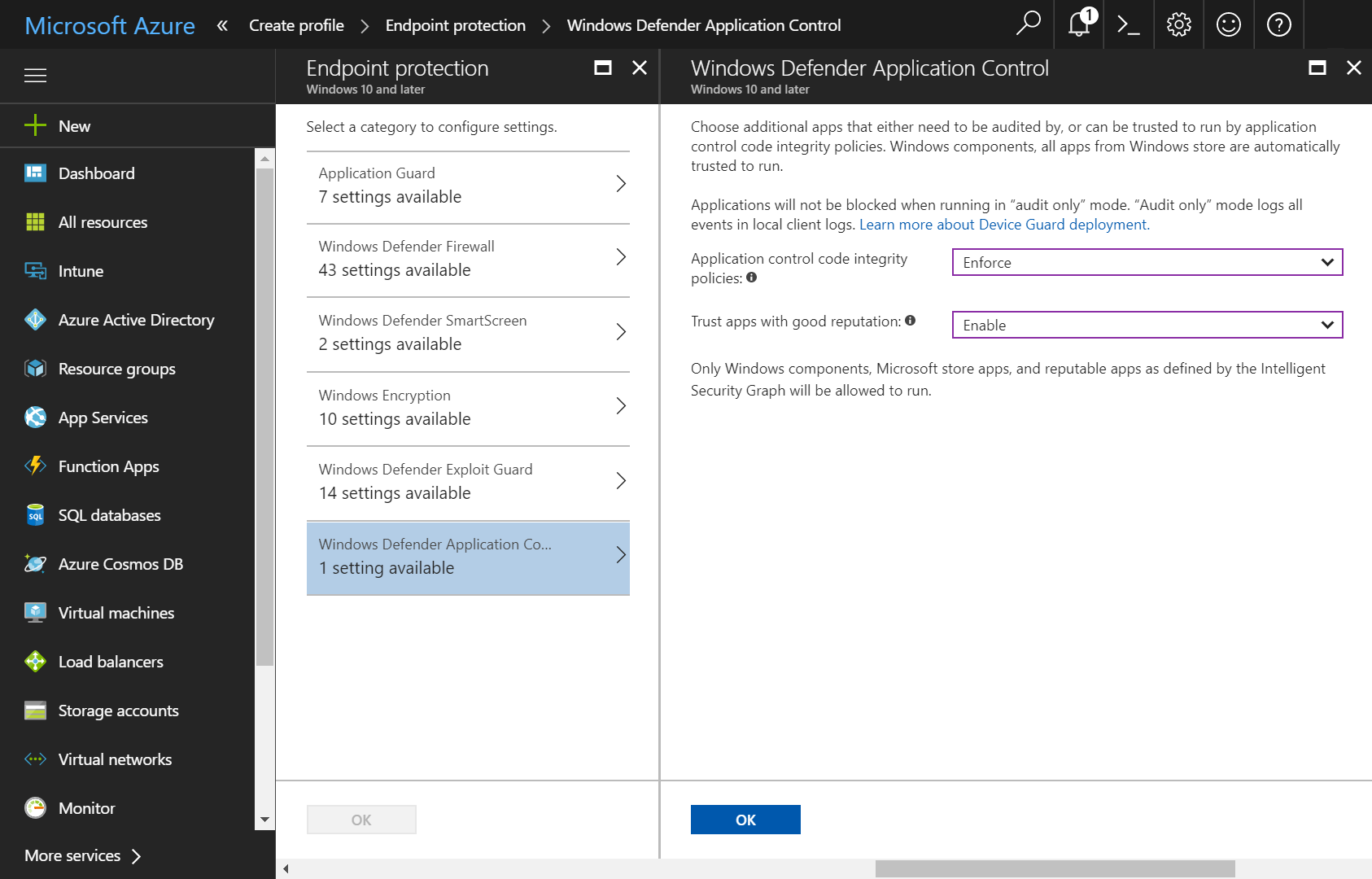
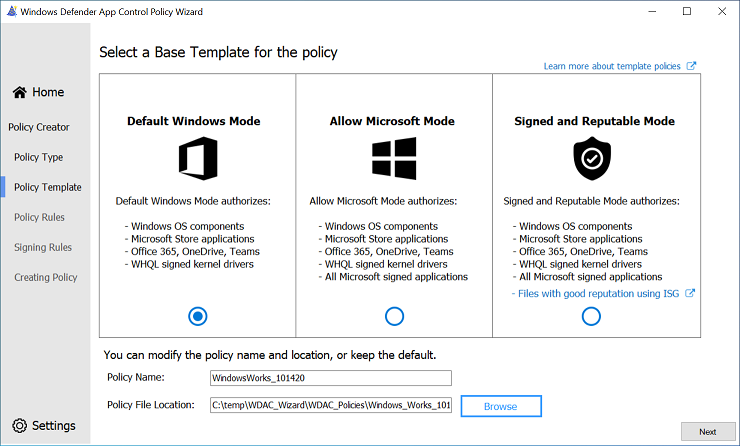
Windows Defender Application Control is the original technical name for the code integrity feature now marketed by Microsoft as App Control for Business (covered separately as item 7 in this guide); the two names refer to the same underlying kernel-level enforcement engine, and much of the independent documentation, tooling, and community guidance still refers to it as WDAC.
It enforces a Deny by Default model at the kernel level, evaluating every executable, script, driver, and DLL against an administrator-defined policy before it is allowed to load into memory, which is why Microsoft and independent researchers generally regard it as harder to bypass than its predecessor, AppLocker. Policies are built and deployed through Group Policy, Microsoft Intune, or the WDAC Wizard tool, and organizations typically start in audit mode to capture a baseline of legitimate software before switching to enforcement.
Key features include:
| Criterion | Solution Fit | Key Considerations |
|---|---|---|
| Policy model and trust definition | Deny by Default kernel-level enforcement using signer, hash, path, ISG reputation, and managed-installer rules; the same rule model documented under App Control for Business. | Policies are relatively easy to misconfigure, and overly permissive path rules over user-writable directories can undermine enforcement. |
| Software updates and exception handling | Managed installer and publisher-based rules let signed updates through without per-release hash changes; ISG reputation covers unsigned but well-known code. | Manual upkeep of policy XML is widely described as a burden, and legitimate applications get blocked if not correctly allowlisted first. |
| Rollout and enforcement modes | Audit-mode-first deployment is the documented approach, logging what would be blocked to Windows Event Viewer before any enforcement is switched on. | Authoring, testing, and merging base and supplemental policies takes more upfront investment than simpler allowlisting tools, and is commonly cited as the biggest adoption barrier. |
| Platform and environment coverage | Windows 10 and 11 and Windows Server 2016 and later; enforcement applies machine-wide at the kernel level. | Windows-only, so a second product is needed for macOS and Linux; as a built-in OS feature rather than a purchased product, there's no dedicated vendor account team or support SLA. |
| Visibility, reporting and compliance evidence | Block and audit events surface through the Windows Event Log (CodeIntegrity/Operational) and whichever management platform (Intune, Group Policy, Windows Admin Center) is used for deployment. | Reporting depends entirely on the surrounding management tooling rather than a purpose-built console; there's also no G2 or PeerSpot rating to benchmark it against dedicated commercial platforms, since it isn't sold or reviewed as a standalone product. |
Source: Windows
Best for: Servers and fixed function systems managed via ePolicy Orchestrator
Strengths: Execution rules plus write and read protection for critical files
Things to consider: Deployment and policy tuning expect experienced administrators
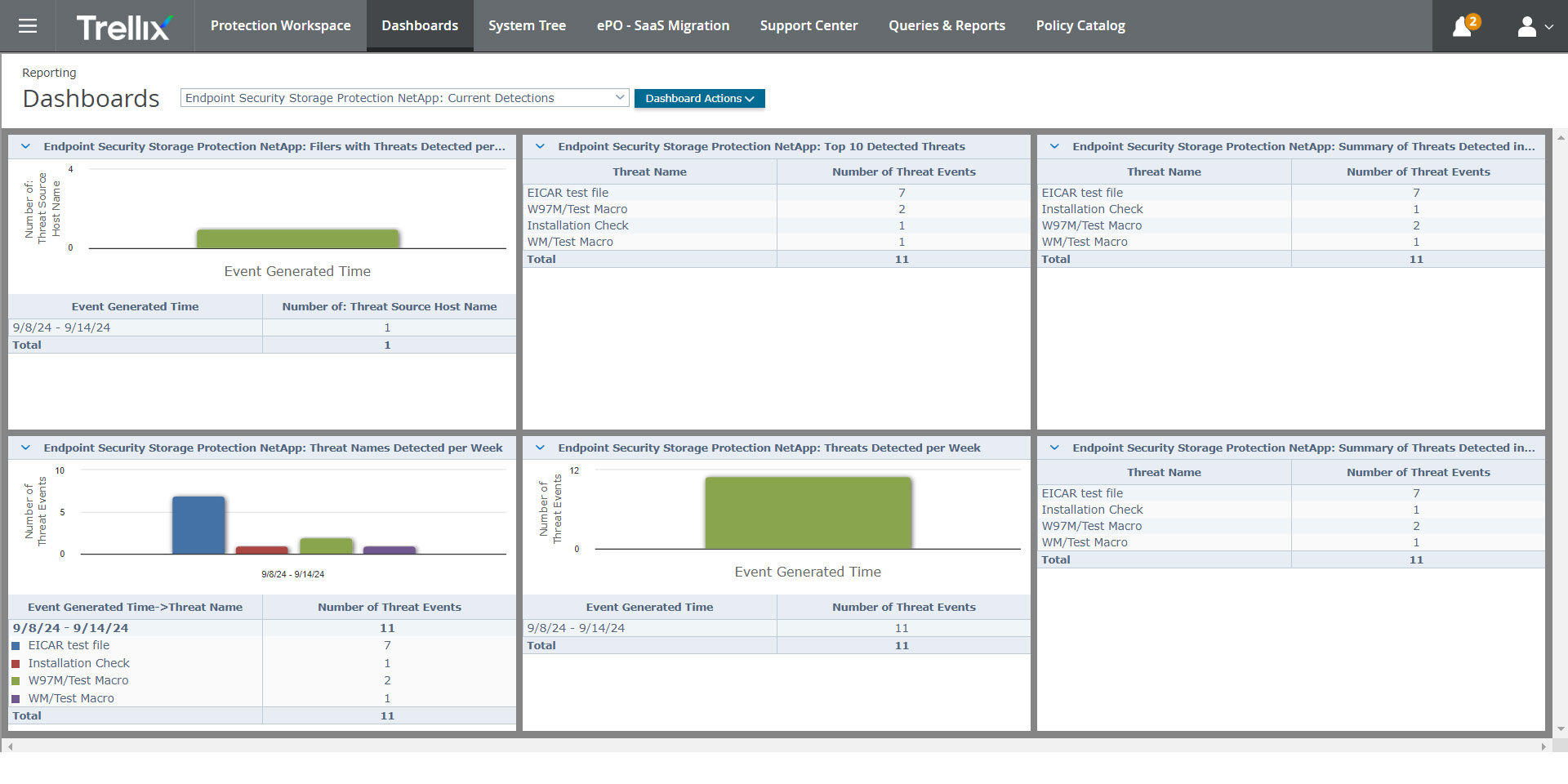
Trellix Application and Change Control ensures that only trusted applications run on devices, servers and desktops, and pairs that with change control that write-protects and read-protects critical files against unauthorized tampering. It is positioned against advanced persistent threats targeting control points, servers and fixed devices.
Execution rules can be combined across several attributes rather than a single identifier, which allows policy to distinguish between the same binary launched in different contexts. Trellix Global Threat Intelligence supplies file and sender reputation data, and inventory search with pre-defined reports is used to surface vulnerability, compliance and security issues across managed systems.
Key features include:
| Criterion | Solution Fit | Key Considerations |
|---|---|---|
| Policy model and trust definition | Rules combine file name, process name, parent process name, command line parameters and username, alongside file write and read protection. | Reviewers report issues in some versions with policy configuration around parent and child process relationships. |
| Software updates and exception handling | A dynamic trust model backed by Global Threat Intelligence reputation reduces manual list updates, with user notifications and self-approvals for new installs. | Reviewers ask for stronger alerting and clearer guidance when tuning approval behavior. |
| Rollout and enforcement modes | Inventory search, pre-defined reports and policy discovery for dynamic desktop environments support baseline building before enforcement. | Reviewers say more monitoring across enforcement modes would make policy creation easier to configure. |
| Platform and environment coverage | Covers devices, servers and desktops, including fixed-function systems, managed centrally through ePolicy Orchestrator. | Deployment is described by reviewers as a structured process that often requires technical expertise. |
| Visibility, reporting and compliance evidence | Single reporting system for verifying changes against authorizations, with pre-defined compliance reports. | Reviewers repeatedly identify reporting and alerting as areas they would like improved, and note higher initial investment. |
Source: Trellix
Best for: European-hosted application, device, and encryption control under one console
Strengths: EAL3+ certified allowlisting paired with device control and encryption
Things to consider: Console still split across two interfaces; smaller global review base
DriveLock is a German-headquartered endpoint security vendor whose HYPERSECURE platform combines application control with device control, encryption, and vulnerability management. Application Control blocks any application, script, or DLL that is not on the organization's allowlist, and pairs that enforcement with Application Behavior Control, which governs how already-approved applications are permitted to interact with the system once running, rather than treating trust as a one-time execution decision.
The platform is offered as a cloud-based solution hosted on Microsoft Azure or as an on-premises install, giving organizations with EU data residency requirements a choice of hosting model. DriveLock's application and device control capabilities are certified to Common Criteria EAL3+, and the company positions its broader platform against compliance frameworks including BSI, C5, GDPR, NIS2, TISAX, and ISO 27001.
Key features include:
| Criterion | Solution Fit | Key Considerations |
|---|---|---|
| Policy model and trust definition | Deny by Default allowlisting with automated list building, paired with Application Behavior Control governing how approved apps interact with the system once running. | Behavior-level controls are less granular than the context-aware publisher/parent-process trust rules offered by dedicated allowlisting specialists. |
| Software updates and exception handling | Automated allowlisting is designed to reduce manual list maintenance as software updates roll out, with notifications when something is blocked. | Reviewers note that handling exceptions and events still requires moving between two separate consoles. |
| Rollout and enforcement modes | Application control deploys alongside DriveLock's device control and encryption modules from one policy engine. | Because it's bundled with a wider endpoint security suite, teams wanting application control in isolation may find the platform broader than needed. |
| Platform and environment coverage | Available cloud-hosted on Microsoft Azure or on-premises, suited to organizations with EU data residency needs; certified to Common Criteria EAL3+. | English-language documentation and independent review coverage is comparatively limited next to larger competitors. |
| Visibility, reporting and compliance evidence | Central dashboards report on blocked and allowed activity, with platform-wide compliance positioning against BSI, C5, GDPR, NIS2, TISAX and ISO 27001. | Some reviewers say event data doesn't always load promptly from the DOC (DriveLock Operations Center), and there's no automatic cleanup for stale release records. |
Source: DriveLock
Best for: Windows estates standardizing on native, licence included controls
Strengths: Kernel level enforcement with signer, ISG and installer based rules
Things to consider: Policy authoring and XML upkeep carry a steep learning curve
Windows includes two application control technologies: App Control for Business and AppLocker. App Control changes Windows from an environment where all code runs unless antivirus predicts it is bad, to one where code runs only if policy permits it, and it restricts what runs in the System Core as well as in user space.
Control extends beyond applications to scripts, Microsoft installers, command-line batch files and interactive PowerShell sessions, which run in Constrained Language Mode. App Control policies apply to the whole machine and every user on it; AppLocker operates per user or group and is used for shared-device scenarios and mixed operating system estates. Microsoft advises using App Control where possible, since AppLocker receives security fixes but not new features.
Key features include:
| Criterion | Solution Fit | Key Considerations |
|---|---|---|
| Policy model and trust definition | Rules based on signing certificate, binary metadata, hash, ISG reputation, managed installer, path and launching process, with kernel-level enforcement. | Practitioner sources note policies are relatively easy to misconfigure, and permissive path rules over user-writable directories can undermine enforcement. |
| Software updates and exception handling | Managed installer and publisher-based rules allow signed updates without per-release hash changes; ISG reputation covers unsigned but well-known code. | Manual upkeep of XML rules is widely described as a burden, and legitimate applications are blocked if not correctly allowlisted first. |
| Rollout and enforcement modes | Audit-mode-first deployment is the documented approach, capturing what legitimately runs before any blocking is enabled. | Configuring policies is described as complex and time consuming for large organizations, with a steep implementation learning curve. |
| Platform and environment coverage | Windows 10 and 11 and Windows Server 2016 through 2025; App Control applies machine-wide, AppLocker applies per user or group. | Windows only, so a second product is needed for macOS and Linux. AppLocker runs in user mode and is not receiving new feature work. |
| Visibility, reporting and compliance evidence | Block events surface through the Windows event log and the management platform used for deployment. | Reporting depends on the surrounding management tooling; Intune's built-in controls are described as lacking granularity for larger applications. |
Source: Microsoft
Best for: Windows desktops and servers needing app control with privileges
Strengths: Trusted ownership rules and helpdesk driven change requests
Things to consider: Staged deployment advised, and coverage centers on Windows
Ivanti Application Control combines dynamic allowed and denied lists with privilege management, so that unauthorized code execution is prevented without IT maintaining extensive lists manually. It is part of the Ivanti User Workspace Manager suite and is offered in Windows desktop and Windows Server variants, the latter aimed at role-based user access on servers.
Trusted ownership is the mechanism that keeps list maintenance down: only applications introduced by trusted administrators are permitted to execute. Alongside that, automated requests and approvals run through integrated helpdesk systems, so exception handling follows the ticketing process an organization already uses rather than a separate console.
Key features include:
| Criterion | Solution Fit | Key Considerations |
|---|---|---|
| Policy model and trust definition | Dynamic allowed and denied lists, trusted ownership, digital signature verification and granular context-aware policies covering consoles, applications and commands. | Reviewers ask for more customization options in policy configuration. |
| Software updates and exception handling | Trusted ownership means software introduced by trusted administrators executes without list updates; helpdesk-integrated change requests handle exceptions and self-elevation. | Approval workflows depend on the integrated helpdesk system, so the experience is tied to that platform's configuration. |
| Rollout and enforcement modes | Policy and privilege are managed automatically at a granular level, with optional self-elevation available during exception scenarios. | Reviewers advise deploying gradually and in stages, noting that rollout takes time without prior experience of the product. |
| Platform and environment coverage | Windows desktops and Windows Servers, delivered as part of the Ivanti User Workspace Manager suite. | Coverage centers on Windows, so macOS and Linux endpoints need a separate control. |
| Visibility, reporting and compliance evidence | Configurable events track execution denials, privilege elevations and access tasks, with pre-built dashboards via the UWM Management Center or Xtraction. | Reviewers note documentation could be improved, which affects how quickly reporting is configured to suit an organization. |
Source: Ivanti
Best for: Smaller IT teams starting app control alongside privilege management
Strengths: Discover, audit and enforce workflow with free tier for 25 endpoints
Things to consider: Just in time access needs the Endpoint Central add-on
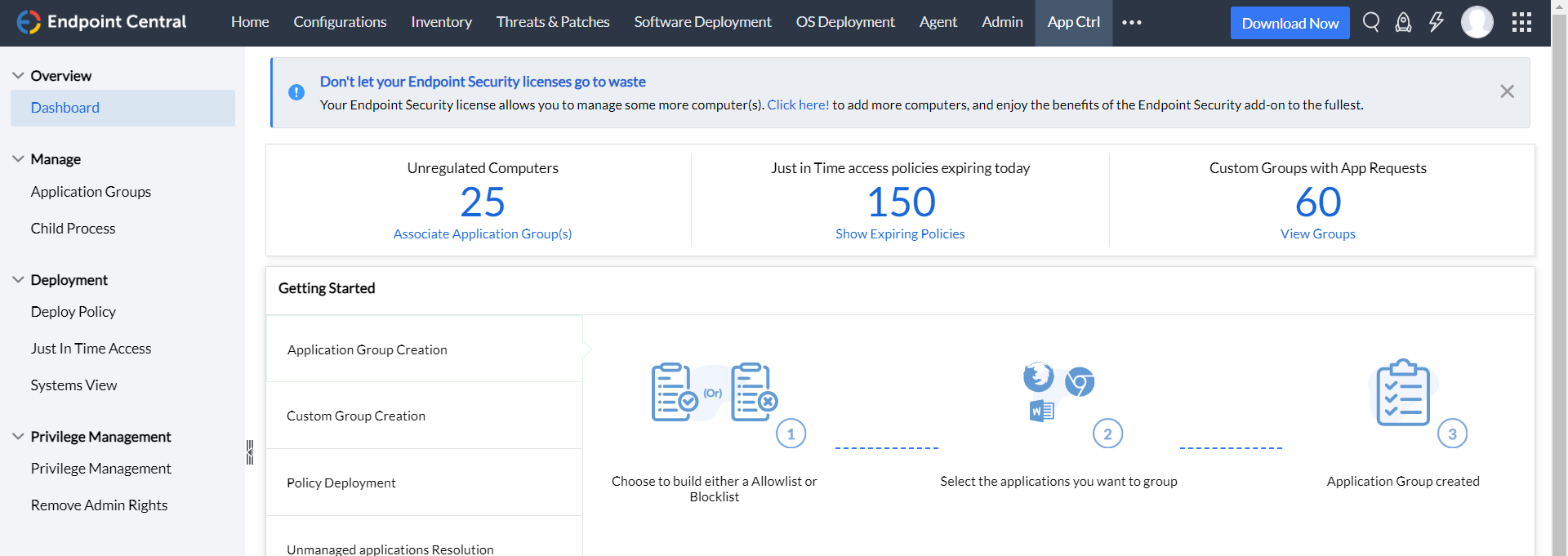
ManageEngine Application Control Plus stops unauthorized applications from running on endpoints and pairs application control with endpoint privilege management in a single product. Rules are created to allow trusted applications and block risky or unapproved software, and unauthorized executions and block events are audited.
The documented workflow runs in three stages: discover which applications are running across endpoints, audit execution and policy impact without disrupting users, then enforce by allowing only approved applications. Deployment is available on-premises or in the cloud through the Endpoint Security Platform, with a free edition covering up to 25 endpoints and a professional edition priced per endpoint per year.
Key features include:
| Criterion | Solution Fit | Key Considerations |
|---|---|---|
| Policy model and trust definition | Rule-based allowlisting and blocklisting for application execution, combined with policy-based control over privilege elevation. | The product page describes rules at application level; confirm the available rule attributes against your environment before purchase. |
| Software updates and exception handling | Just-in-time application access temporarily permits an application and revokes it automatically by policy. | Just-in-time access is delivered only through Endpoint Central with the Application Control and Endpoint Privilege Management add-on, not the standalone product. |
| Rollout and enforcement modes | A documented discover, audit and enforce sequence lets teams monitor execution and policy impact before blocking anything. | No user reviews were available on G2 or PeerSpot, so real-world rollout experience is harder to verify independently. |
| Platform and environment coverage | Deployed on-premises via download or in the cloud through the Endpoint Security Platform, with a free edition for up to 25 endpoints. | Broader endpoint protection, including vulnerability and patch management, DLP and EDR, requires moving up to Endpoint Central. |
| Visibility, reporting and compliance evidence | Audit of unauthorized applications and block events, plus a reporting and activity trail for governance. | Reporting sits in the professional edition and above; the free edition is intended for validating policies at small scale. |
Source: ManageEngine
Best for: Pairing endpoint privilege elevation with policy-based application control
Strengths: Least-privilege elevation combined with allowlisting, sandboxing, and behavior analytics
Things to consider: Setup and policy tuning take time; reporting customization has room to grow
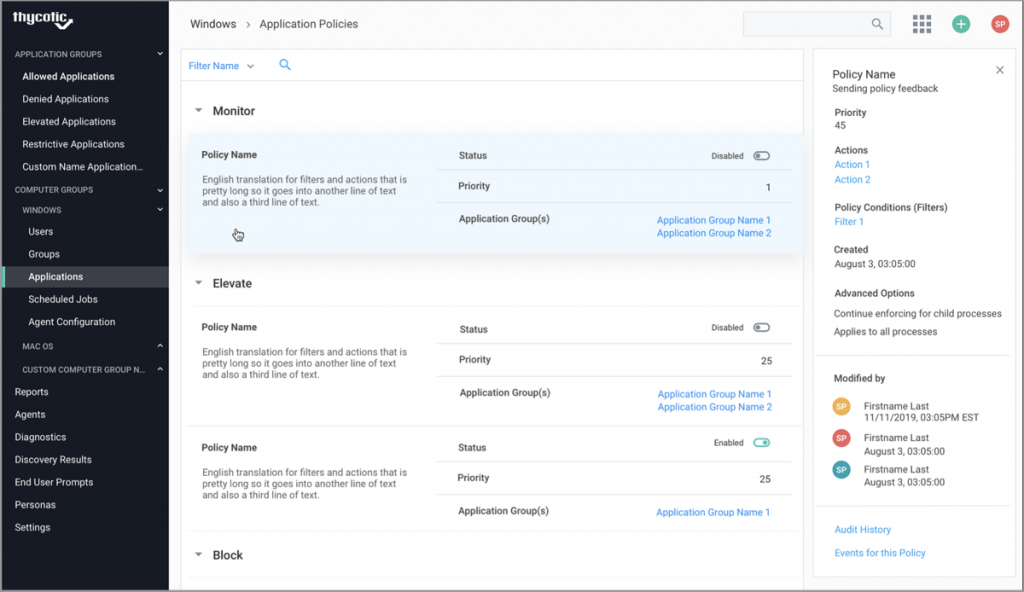
Delinea Privilege Manager (formerly Thycotic Privilege Manager) combines endpoint privilege elevation with application control, removing standing local administrator rights while still letting approved applications run with the permissions they need. Rather than granting a user broad admin access, Privilege Manager elevates specific applications on a policy basis, so a trusted tool that needs elevated rights can run without the user holding admin privileges more broadly.
The product discovers Windows and Mac accounts and applications across the endpoint estate, then layers application control features including sandboxing, UAC override, child process control, and real-time application analysis on top of the elevation model. It is available as cloud-based or on-premises, with the cloud edition built to scale across hundreds of thousands of machines, and it integrates with Delinea's own Secret Server and Privileged Behavior Analytics alongside third-party SIEM, ticketing, and identity systems.
Key features include:
| Criterion | Solution Fit | Key Considerations |
|---|---|---|
| Policy model and trust definition | Combines blocking, elevation, monitoring, and justification policies rather than a binary allow/deny model, with sandboxing, UAC override, and child process control layered on top. | Administrators new to the least-privilege elevation model, as opposed to allowlisting alone, describe a learning period before the granular options feel intuitive. |
| Software updates and exception handling | Automatic application discovery inventories admin/root-level software across the estate, and just-in-time access lets users request temporary elevation through approval workflows rather than standing grants. | Ongoing tuning is needed as elevation and control policies are applied per application and user group and the software estate changes. |
| Rollout and enforcement modes | Deployable as cloud-based or on-premises, with the cloud edition built to scale across hundreds of thousands of machines. | Reviewers describe the initial deployment and policy configuration process as requiring meaningful time investment before running smoothly in production. |
| Platform and environment coverage | Covers Windows and Mac endpoints, integrating with Delinea's own Secret Server and Privileged Behavior Analytics plus Active Directory, Entra ID, ServiceNow, ConfigMgr/SCCM, and VirusTotal. | Linux endpoint coverage isn't highlighted alongside Windows and Mac in the product's discovery capabilities. |
| Visibility, reporting and compliance evidence | Centralized application and execution event logging, local user/group activity auditing, and customizable dashboards cover usage, blocked malware, and least-privilege compliance. | Reviewers say reporting covers the essentials but would benefit from more tailored dashboard views for different stakeholders. |
Source: Delinea
Selecting the right application control solution requires balancing robust security controls with operational efficiency. Organizations must evaluate policy models, enforcement flexibility, and environment coverage to ensure seamless deployment without disrupting business workflows. Prioritizing centralized management and clear visibility helps security teams enforce effective execution policies and maintain compliance. Careful assessment of these key features ensures long-term protection against unauthorized software execution.