TL;DR: Ransomware protection products block, detect and contain techniques such as LOLBin abuse, credential theft and lateral movement. Best for Deny by Default prevention: Airlock Digital; behavioral EDR with rollback: SentinelOne Singularity Endpoint; managed threat hunting: CrowdStrike Falcon; Microsoft-centric estates: Microsoft Defender for Endpoint.
What Are Ransomware Protection Products and How Can They Mitigate Advanced Attacks?
Leading ransomware protection products use artificial intelligence, behavioral analytics, and storage-layer inspection to defend against advanced and evolving attack techniques. Unlike basic antivirus software, they focus on attacker behavior such as credential theft, privilege escalation, lateral movement, backup tampering, and large-scale file encryption.
Products built for advanced attack techniques typically combine endpoint detection and response, behavioral analytics, application controls, threat intelligence, and automated isolation. They monitor process activity, file changes, scripts, network connections, and authentication events to identify attack chains that may not rely on known malware signatures.
Advanced ransomware attack techniques include:
- PowerShell and script-based attacks: Inspect scripts and command lines for obfuscation, suspicious execution chains, and related network or system changes.
- LOLBins and Living off the Land abuse: Detect unusual arguments, process relationships, and network activity involving legitimate system binaries.
- Fileless malware: Monitor memory, process injection, interpreter activity, and persistence mechanisms to detect attacks without conventional malware files.
- Credential dumping: Identify suspicious access to credential stores and correlate credential theft with subsequent logins and lateral movement.
- Privilege escalation: Detect unexpected elevation, token manipulation, suspicious services, and exploitation that grants attackers higher privileges.
- Remote service and RDP abuse: Flag abnormal remote logins, authentication attempts, service creation, and execution using account and device context.
This is part of a series of articles about ransomware attack.
In this article:
- Ransomware Protection Products at a Glance
- Advanced Ransomware Attack Techniques Products Should Detect
- Key Capabilities to Look for in Advanced Ransomware Protection Products
- Notable Ransomware Protection Products for Advanced Attack Techniques
Ransomware Protection Products at a Glance
The table below summarizes the key differences between the products covered in this guide. We explore each of them in more detail in the sections that follow.
| Category | Solution | Best For | Key Strengths | Things to Consider |
|---|---|---|---|---|
| Application Control and Allowlisting Products | Airlock Digital | Deny by Default application control across IT, OT and legacy systems | Granular allowlisting, LOLBin blocklisting, VirusTotal intelligence | Policy upkeep where apps update often; frequent agent releases |
| Application Control and Allowlisting Products | ThreatLocker | Zero Trust endpoint platform combining allowlisting and Ringfencing | Ringfencing app containment, dynamic ACLs, device isolation | Steep learning curve; app updates need re-approval |
| Application Control and Allowlisting Products | Carbon Black App Control | Locking down servers, fixed-function and EOL systems | Positive security model with FIM, memory and registry protection | Allowlist upkeep at scale; vendor engagement since acquisition |
| Endpoint Detection and Response Platforms | CrowdStrike Falcon Endpoint Security | AI-native EPP and EDR with managed threat hunting | Indicators of attack, single lightweight sensor, OverWatch hunting | Modular licensing costs; console and query learning curve |
| Endpoint Detection and Response Platforms | SentinelOne Singularity Endpoint | Autonomous EPP and EDR with 1-click ransomware rollback | On-agent behavioral AI, Storyline correlation, rollback | Exclusion tuning at scale; query and console learning curve |
| Endpoint Detection and Response Platforms | Microsoft Defender for Endpoint | Multiplatform EDR integrated with the Microsoft security stack | Automatic attack disruption, global threat intel, Defender XDR | Multiple portals; complex licensing; non-Windows parity |
| Endpoint Detection and Response Platforms | Sophos Endpoint | Prevention-first endpoint protection with default-on mitigations | CryptoGuard rollback, 60+ exploit mitigations, Adaptive Attack Protection | Resource use during scans; console navigation and reporting |
| Endpoint Detection and Response Platforms | Cortex XDR | XDR combining endpoint, network, cloud and identity data | Technique-based prevention modules, root-cause analysis, AgentiX | Learning curve for console and XQL; licensing complexity |
Advanced Ransomware Attack Techniques Products Should Detect
PowerShell and Script-Based Attacks
Ransomware operators often use PowerShell, Windows Script Host, JavaScript, or batch files to download payloads, execute commands, and modify system settings. These interpreters are already available on many systems, allowing attackers to perform malicious actions without introducing an obvious executable.
Protection products should:
- Inspect script content and command-line arguments.
- Detect encoded or obfuscated commands.
- Correlate suspicious script execution with parent processes, network activity, and subsequent system changes.
They should also identify abnormal execution chains, such as an Office application or browser unexpectedly launching PowerShell. Behavioral analysis is important because administrators also use scripting tools for legitimate automation.
LOLBins and Living off the Land Abuse
Living off the Land attacks use legitimate system binaries, or LOLBins, for malicious operations. Tools such as rundll32, regsvr32, certutil, and mshta can execute code, retrieve files, or interact with system components. Because these programs are trusted and commonly present, their execution alone is not a reliable indicator of compromise.
Detection should focus on how these binaries are invoked, including:
- Unusual arguments
- Parent-child process relationships
- External network connections
- Execution from unexpected locations
Products should correlate multiple behaviors rather than blocking LOLBins outright. This helps distinguish administrative activity from attempts to download ransomware, execute malicious libraries, or bypass application controls.
Fileless Malware
Fileless malware executes primarily in memory instead of installing a conventional executable on disk. Attackers may load malicious code through PowerShell, scripts, macros, registry entries, Windows Management Instrumentation, or process injection. This approach reduces the number of files that traditional antivirus scanners can inspect.
Effective protection requires memory and behavioral monitoring that can identify suspicious execution even when there is no malware file available for signature scanning. Products can monitor:
- Process injection
- Abnormal memory allocation
- Suspicious interpreter activity
- Persistence mechanisms that reload malicious code after a restart
Process ancestry and command-line telemetry can also help reconstruct how the fileless attack began.
Credential Dumping
Credential dumping extracts passwords, password hashes, tokens, or other authentication material from compromised systems. Attackers can target LSASS memory, the Security Account Manager database, cached credentials, browser data, or other locations containing reusable authentication information.
Ransomware protection products should detect:
- Unusual access to credential stores
- Suspicious memory reads
- Known credential-dumping behaviors
Detection should extend beyond specific tools because attackers can modify existing utilities or implement the same techniques in custom code. Correlating credential access with subsequent logins can also reveal when stolen credentials are being used for lateral movement.
Privilege Escalation
Attackers may exploit vulnerabilities, weak permissions, stolen administrator credentials, or misconfigured services to obtain higher privileges. Elevated access can allow ransomware operators to:
- Disable defenses
- Modify system settings
- Access protected data
- Execute malware across additional machines
Detection should identify unexpected privilege changes, suspicious service creation, token manipulation, exploitation behavior, and processes that suddenly gain elevated permissions. Products should also establish normal patterns for administrative activity so unusual elevation attempts stand out. Monitoring the events before and after privilege escalation helps determine whether elevated access is part of a larger ransomware attack chain.
Remote Service and RDP Abuse
Remote Desktop Protocol and administrative services provide attackers with ways to control compromised systems and execute ransomware remotely. Valid credentials can make this activity appear similar to normal administration, especially when attackers use built-in remote-management capabilities.
Protection products should detect:
- Unusual remote logins
- Repeated authentication attempts
- Unexpected remote service creation
- Remote execution from accounts or systems that do not normally perform these actions
Context such as login time, source device, account privileges, and subsequent process execution can improve detection. Monitoring exposed remote services can also reveal attempts to gain initial access before ransomware is deployed.
Lateral Movement
After compromising one system, ransomware operators often move through the network to reach servers, domain infrastructure, backup systems, and additional endpoints. Common mechanisms include:
- SMB (Server Message Block)
- Remote services
- Administrative shares
- Remote management tools
- Stolen credentials
Products should correlate authentication, network, and execution activity across systems to identify movement that may appear less suspicious when each endpoint is examined separately. Indicators can include one account suddenly accessing many machines, remote processes appearing across multiple endpoints, or unusual use of administrative shares. Detecting lateral movement early can limit the number of systems an attacker reaches before encryption begins.
Security Tool Disabling and Tampering
Ransomware frequently attempts to:
- Terminate security processes
- Disable services
- Modify policies
- Add antivirus exclusions
- Interfere with endpoint agents
Attackers may also delete logs or change monitoring settings to reduce visibility before deploying the ransomware payload. Protection products should monitor their own configuration and other security controls for unauthorized changes. Tamper protection can prevent users and processes without appropriate authorization from disabling critical defenses. Products should also generate high-priority alerts when security controls are modified unexpectedly, since defense evasion can indicate that an attacker is preparing for later stages of an intrusion.
Backup Deletion and Recovery Inhibition
Attackers may delete volume shadow copies, disable recovery features, erase backup catalogs, or compromise connected backup infrastructure before encryption begins. Removing recovery options increases the operational impact of ransomware and makes restoring systems without external backups more difficult.
Products should:
- Detect commands, scripts, and API activity associated with recovery inhibition.
- Protect backup credentials and repositories from compromised endpoints.
Attempts to access or modify many backups at once can also provide an early warning signal. Immutable or isolated backups add another recovery layer because compromised administrator accounts or endpoints cannot easily alter them.
Data Exfiltration and Double Extortion
Many ransomware operations steal sensitive data before encrypting systems and then use the threat of disclosure as additional leverage. Attackers may:
- Collect files from multiple systems
- Compress them into archives
- Stage them in temporary locations
- Transfer them to external infrastructure
Detection should cover unusual archive creation, large-scale file access, data staging, and unexpected outbound transfers to cloud storage or unfamiliar destinations. Network monitoring can help identify unusual transfer volumes or protocols, while endpoint telemetry can reveal which processes collected and prepared the data. Correlating exfiltration with credential abuse, lateral movement, and defense evasion provides stronger evidence of a broader ransomware operation.
Key Capabilities to Look for in Advanced Ransomware Protection Products
1. Real-Time Behavioral Ransomware Detection
Real-time behavioral detection identifies ransomware by monitoring what processes do rather than relying only on known malware signatures. Products should detect behaviors such as rapid file modification, mass encryption, unusual file renaming, shadow copy deletion, and attempts to access large numbers of files.
Behavioral detection is especially useful against new ransomware variants and customized payloads that signature-based tools may not recognize. Strong products correlate several suspicious events before taking action, helping distinguish ransomware from legitimate applications that perform high-volume file operations.
2. Application Allowlisting and Deny by Default Controls
Application allowlisting restricts execution to approved applications, scripts, libraries, and other executable content. A Deny by Default approach blocks software unless it meets defined trust rules, reducing the opportunity for unknown ransomware payloads to run.
Products should provide flexible policies based on factors such as file hashes, publishers, certificates, paths, and application reputation. Administrators also need controlled exception workflows because overly restrictive policies can interfere with legitimate software updates, internal applications, and administrative tools.
3. Script, PowerShell, and Command-Line Controls
Ransomware operators frequently use PowerShell, command shells, and scripting engines to download payloads, change configurations, or execute malware. Protection products should monitor script contents, command-line arguments, encoded commands, and suspicious relationships between processes.
Controls can restrict which users or applications are permitted to launch interpreters and block known dangerous execution patterns. Detailed command-line logging also gives security teams useful context when investigating an alert and determining which actions occurred before ransomware execution.
4. Credential Theft Detection
Credential theft detection identifies attempts to obtain passwords, hashes, authentication tokens, and other credentials from endpoints. Products should monitor access to sensitive processes and credential stores, including unusual interaction with LSASS and other authentication components.
Detection should cover behavioral techniques rather than only known credential-dumping utilities. The product should also correlate suspicious credential access with later authentication activity, helping security teams identify when stolen credentials are being used to access additional systems.
5. Automated Endpoint Isolation
Automated endpoint isolation disconnects a suspected compromised device from most network resources while preserving communication with the security platform. This can prevent ransomware from spreading to shared storage, servers, and other endpoints.
Products should support both automatic isolation based on high-confidence detections and manual isolation initiated by security teams. Administrators should also be able to define exceptions for necessary management services and restore connectivity after the affected system has been investigated and remediated.
6. Malicious Process Blocking and Termination
Ransomware protection products should be able to block malicious processes before they execute or terminate them when dangerous behavior is detected. Fast intervention is important because ransomware can encrypt large numbers of files within a short period.
Process controls should consider executable reputation, process ancestry, command-line arguments, code behavior, and interactions with other applications. Products should also terminate related child processes when appropriate so stopping one component does not leave another part of the ransomware chain running.
7. File and Registry Activity Monitoring
Monitoring file and registry activity helps identify the system changes associated with ransomware execution, persistence, and defense evasion. Relevant behaviors include rapid file modifications, extension changes, deletion of recovery data, creation of persistence entries, and modifications to security settings.
Products should record which process and user account performed each important change. This context helps distinguish malicious activity from normal software operations and provides useful evidence during incident investigation. Some products can also use this information to reverse selected changes or support file recovery.
8. Anti-Tampering Protection
Anti-tampering controls prevent attackers from disabling or modifying the security product after gaining access to an endpoint. They can protect security services, processes, configuration files, registry settings, policies, and local agents from unauthorized changes.
Effective tamper protection should continue operating when an attacker obtains elevated privileges. Products should detect attempts to stop services, uninstall agents, change exclusions, or weaken security policies and send alerts when these actions occur. Centralized controls can further prevent compromised local administrator accounts from changing protection settings.
Notable Ransomware Protection Products for Advanced Attack Techniques
How we selected these products: We shortlisted ransomware protection products based on application control and Deny by Default enforcement, behavioral and script-based detection, credential theft and lateral movement detection, automated endpoint isolation, and anti-tampering capabilities.
Application Control and Allowlisting Products
1. Airlock Digital

Best for: Deny by Default application control across IT, OT and legacy systems
Strengths: Granular allowlisting, LOLBin blocklisting, VirusTotal intelligence
Things to consider: Policy upkeep where apps update often; frequent agent releases
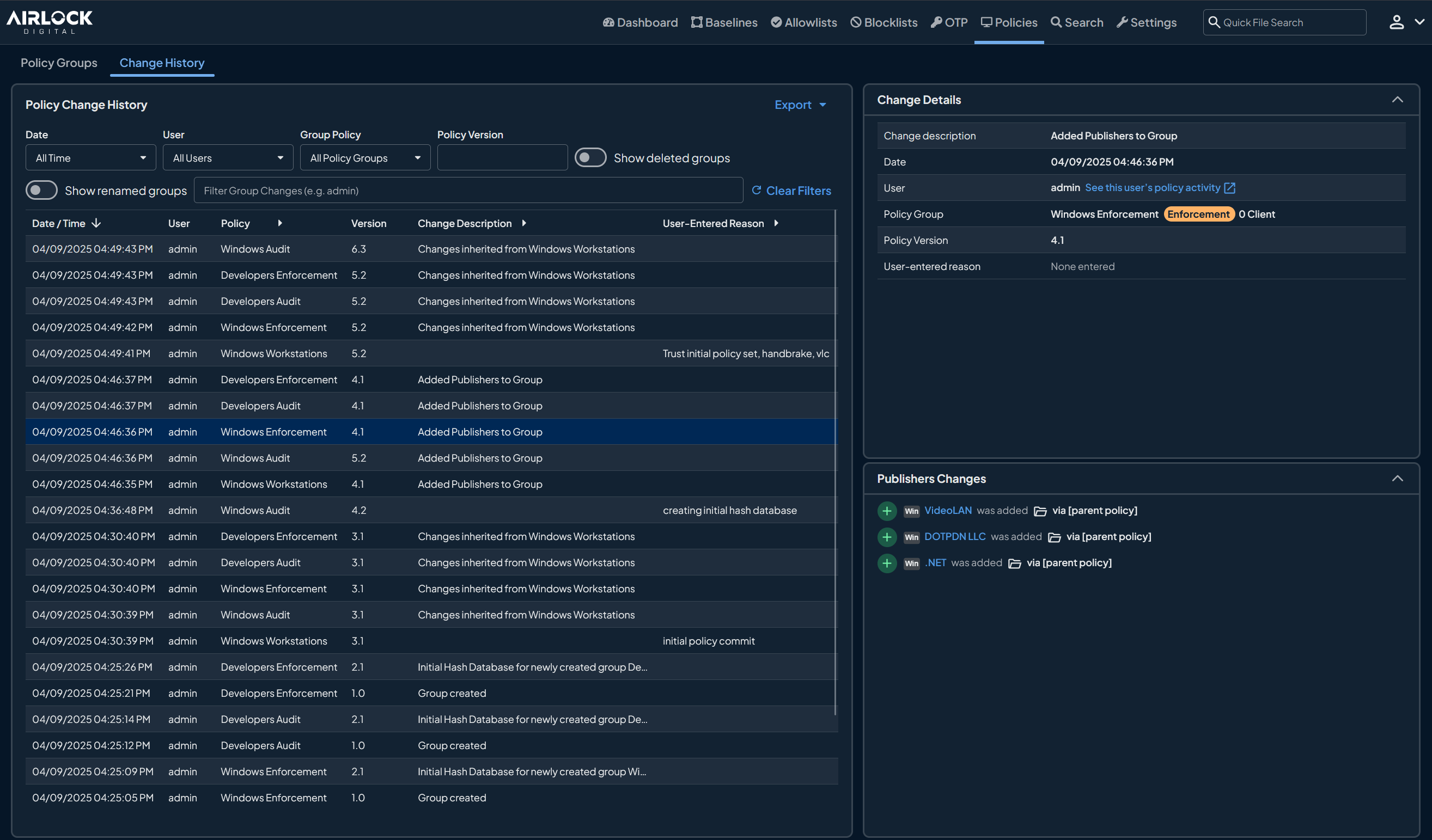
Airlock Digital is an application control solution that enforces a Deny by Default model on endpoints, so only trusted applications, scripts, libraries and processes are permitted to execute and everything else is blocked. Trust is defined at the file, path, publisher or parent process level. The platform also blocklists unauthorized use of trusted binaries such as PowerShell and WMI to prevent Living off the Land attacks.
It runs on current and legacy versions of Windows, macOS and Linux, extends to OT and air-gapped environments through an offline mode, and integrates with VirusTotal, CrowdStrike, Jamf and SIEM tools. Exception handling uses rule-based overrides and One-Time Passwords (OTPs) so administrators can grant temporary execution without weakening the overall policy.
Key features include:
- Deny by Default allowlisting: Automatically blocks all untrusted and unauthorized applications, scripts and processes so that unknown ransomware payloads and unwanted scripts cannot run, regardless of how they were delivered to the endpoint.
- Granular trust rules: Defines trusted applications at the file, path, publisher or parent process level, giving administrators precise control over what executes and under which execution chain.
- Precision blocklisting for LOLBins: Uses launch conditions including path, product name, publisher, version, user, command line and operating system, plus pre-defined blocklists, to restrict misuse of native tools such as PowerShell, WMI and remote administration utilities.
- Integrated file-level intelligence: Pulls VirusTotal intelligence into the console so administrators can understand the context and history of unknown files before deciding whether to trust them.
- Exception management and OTPs: Supports rule-based overrides for specific scenarios and secure One-Time Passwords that allow temporary execution of untrusted applications while enforcement stays in place elsewhere.
- Offline mode and cross-platform coverage: Keeps enforcement running on air-gapped and non-internet-connected systems, and applies consistent policies across IT, OT and hybrid environments including legacy operating systems.
- Visibility and audit trails: Monitors application behavior and maintains audit trails of execution decisions that can be exported to SIEM tools for compliance and investigation.
Limitations (as reported by users on PeerSpot):
- Documentation depth: Some users would like more detailed user guides to shorten the learning curve when first onboarding to the platform.
- Release cadence: New agent versions arrive every few months, which adds change-management work in tightly controlled environments.
- Initial policy configuration: Setting up the first policies can take some time for administrators who are new to allowlisting before the workflow becomes routine.

Source: Airlock Digital
2. ThreatLocker

Best for: Zero Trust endpoint platform combining allowlisting and Ringfencing
Strengths: Ringfencing app containment, dynamic ACLs, device isolation
Things to consider: Steep learning curve; app updates need re-approval
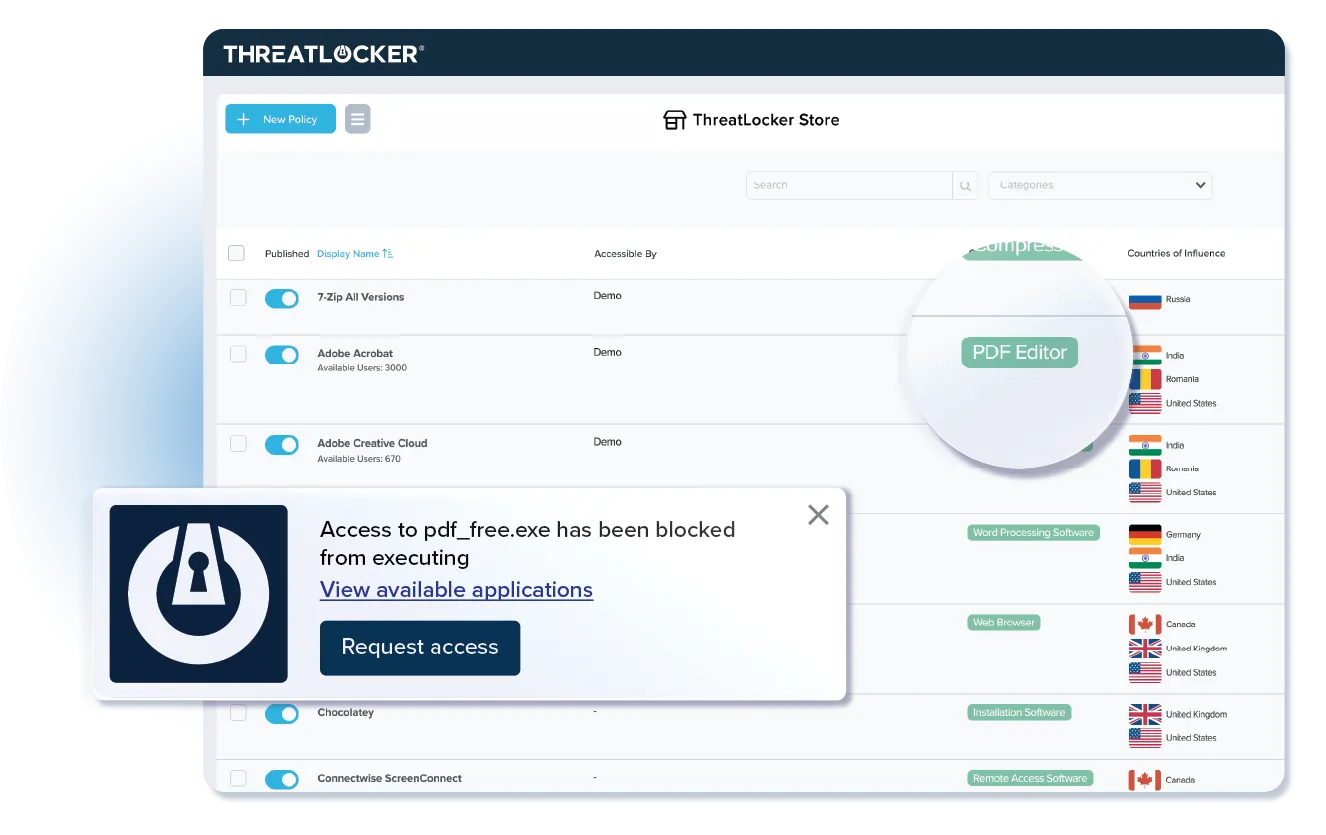
ThreatLocker is a Zero Trust endpoint protection platform that denies execution of unknown binaries, scripts and libraries by default and then restricts what approved applications are allowed to do. Its Ringfencing capability defines how applications interact with each other and with files, the registry and the network, so that Word cannot spawn PowerShell and PowerShell cannot open outbound internet connections.
The platform extends the same Deny by Default model to network and cloud access. Dynamic ACLs restrict RDP, SMB, WinRM and SSH to approved source devices, cloud access is refused when a request does not come from a trusted device, and EDR detection can isolate a compromised endpoint. Additional modules cover privileged access, storage control, patching and web content.
Key features include:
- Application allowlisting: Blocks execution of unknown binaries, scripts and libraries by default, with visibility into every application, dependency and update so administrators control what runs, when, where and by whom.
- Ringfencing: Contains trusted applications so they cannot launch attack chains, limiting what each program can access across other applications, files, registries and the internet to stop fileless malware and exploits of legitimate tools.
- Mass-encryption detection: Detects abnormal file activity, automatically blocks excessive file writes, restricts share access and triggers device-level lockdown before ransomware spreads.
- Zero Trust Network Access with dynamic ACLs: Denies east-west traffic by default, restricts administrative protocols such as RDP, SMB, WinRM and SSH to approved devices, and makes servers unresponsive to unauthorized devices to stop remote encryption.
- EDR real-time threat detection and isolation: Automatically isolates compromised endpoints at the device level, cutting off lateral movement paths while the rest of the network keeps operating.
- Zero Trust Cloud Access: Routes cloud traffic through a managed gateway and denies access when the device and network are not trusted, even if credentials are valid or a token has been intercepted.
- Privileged access, storage and configuration modules: Removes standing admin privileges, controls where users can access, store, modify and delete data, and adds centralized configuration management and a controlled application testing environment.
Limitations (as reported by users on G2):
- Learning curve: Understanding the policy structure and how the modules fit together takes time, and configuration can be difficult without dedicated IT resources.
- Update re-approval overhead: Application updates that change files or DLLs are blocked until reviewed, generating recurring approval requests and end-user friction.
- Learning mode limits: Learning mode may allowlist more than intended or miss dependencies, so building and maintaining policies still requires manual effort.
- Performance on older hardware: Some users report slowdowns on devices with limited system resources.
- macOS parity: The macOS agent is reported as less mature than the Windows version.
- Reporting and portal issues: Reports can be noisy or incomplete for partial deployments, occasional bugs reach the production portal, and legitimate OS programs are sometimes blocked.

Source: ThreatLocker
3. Carbon Black App Control

Best for: Locking down servers, fixed-function and EOL systems
Strengths: Positive security model with FIM, memory and registry protection
Things to consider: Allowlist upkeep at scale; vendor engagement since acquisition
Carbon Black App Control, now part of Broadcom, applies a positive security model in which unknown software is untrusted by default and must be explicitly approved before it can execute. It combines application allowlisting and denylisting with file integrity monitoring, device control, memory protection and registry protection, and can be deployed on-premises, in AWS, Azure or hosted private clouds.
The product supports Windows including XP, Server, Embedded/POS and ARM64, macOS, and RHEL and Oracle Linux, and is used to lock down air-gapped systems, fixed-function devices such as ATMs and POS terminals, and servers on end-of-life operating systems. Rather than maintaining static hash lists, it approves software through trusted directories, cloud reputation, trusted publishers and custom rules.
Key features include:
- Application control: Uses allowlisting and denylisting to enforce granular rules on how applications execute and interact with system resources, so unapproved ransomware binaries cannot run.
- File integrity monitoring and control: Tracks alterations to sensitive files, registry keys and operating system folders, alerting on unauthorized changes in monitoring mode and actively blocking them in control mode.
- Memory and process hollowing protection: Enforces strict memory access boundaries to prevent malicious processes from reading or injecting code into unauthorized memory space, covering credential dumping and injection techniques.
- Registry protection: Locks down system-critical Windows registry keys and reports or blocks unauthorized modifications used to establish persistence or corrupt OS configurations.
- Trusted content approval: Approves clean software through pre-approved directories, cloud reputation scores, trusted publishers and custom rules based on path, process, user or publisher, and can route unknown files for static or dynamic analysis before approving or banning them.
- Device control: Regulates data transfers to and from external media such as USB drives, with access rules based on users, groups or schedules.
- Flexible deployment coverage: Runs in on-premises data centers, AWS, Azure or hosted private clouds and protects air-gapped systems, fixed-function devices and legacy operating systems that cloud-only agents cannot cover.
Limitations (as reported by users on Gartner Peer Insights):
- List maintenance at scale: Keeping allow and block lists accurate and short across a large organization is described as time-consuming, with significant effort spent on allowlisting and working with users.
- Learning curve: Users note a lot of nuance in the product and that there always seems to be one more thing to learn.
- Vendor engagement since acquisition: Some users report the sales team became less available after the VMware acquisition and are waiting to see how development continues under Broadcom.
- File-centric enforcement: Users note the control catches files rather than activity in memory, so it is typically paired with other tools.

Source: Carbon Black

Endpoint Detection and Response Platforms
4. CrowdStrike Falcon Endpoint Security

Best for: AI-native EPP and EDR with managed threat hunting
Strengths: Indicators of attack, single lightweight sensor, OverWatch hunting
Things to consider: Modular licensing costs; console and query learning curve
CrowdStrike Falcon delivers endpoint protection and EDR from a single lightweight sensor on the cloud-native Falcon platform. It combines on-sensor AI, adversary intelligence and indicators of attack to block known and unknown ransomware, malware-free intrusions and LIving off the Land techniques across Windows, macOS and Linux.
The platform continuously monitors endpoint behavior and correlates it with identity, cloud and third-party data in Falcon Next-Gen SIEM. OverWatch threat hunters monitor activity around the clock, and CrowdStrike also runs tabletop, red team/blue team and adversary emulation exercises to test ransomware defenses. It recorded 100% protection in the SE Labs EDR Ransomware Test for four consecutive years.
Key features include:
- AI and threat-intelligence prevention: Stops known and unknown ransomware using AI, threat intelligence and indicators of attack, covering malware-free attacks and Living off the Landand techniques rather than relying on file signatures.
- Continuous behavioral monitoring: Provides real-time visibility into ransomware activity across endpoints by continuously monitoring for suspicious behavior.
- Remote ransomware protection: Detects and stops remote ransomware attacks in which an unprotected device attempts to encrypt files on protected endpoints.
- Managed threat hunting: OverWatch hunters use focused intelligence to detect and neutralize ransomware operators before payloads are deployed.
- Software supply chain blocking: Blocks malicious npm and PyPI packages on Windows, macOS and Linux before code can run, with enterprise-wide package visibility and fleet-wide remediation from the same sensor.
- AI-driven triage and response: Combines AI-powered detection triage, investigation and response actions to reduce manual work and cut mean time to response.
- Cross-domain visibility: Extends protection beyond the endpoint through the Falcon platform and ingests 10GB/day of third-party data at no cost in Next-Gen SIEM for cross-domain investigation.
- Readiness exercises: Tabletop, red team/blue team and adversary emulation exercises drill ransomware defenses and identify gaps.
Limitations (as reported by users on G2):
- Modular licensing costs: Many capabilities are sold as separate modules, and pricing is reported as high for smaller organizations, with unclear packaging overlap.
- Console complexity: The management console is feature-dense with inconsistent navigation, creating a steep learning curve for new administrators.
- Query language learning curve: The Falcon and Next-Gen SIEM query languages take time to learn, especially for teams coming from KQL or Splunk.
- Alert tuning and false positives: Aggressive prevention policies can flag developer tools and internal scripts, and tuning takes trial and error.
- Sensor update controls: After the 2024 update incident, users want more granular update control and clearer alerts when a sensor update fails.
- Legacy OS and reporting gaps: End-of-life operating systems are not supported, and leadership-facing reporting is described as limited.

Source: CrowdStrike
5. SentinelOne Singularity Endpoint

Best for: Autonomous EPP and EDR with 1-click ransomware rollback
Strengths: On-agent behavioral AI, Storyline correlation, rollback
Things to consider: Exclusion tuning at scale; query and console learning curve
SentinelOne Singularity Endpoint unifies endpoint protection, EDR and identity correlation in one agent that runs behavioral AI locally, so detection and containment continue when a device is offline. The behavioral model identifies ransomware, zero-day exploits, supply chain attacks and fileless malware by what processes and users do rather than by signatures.
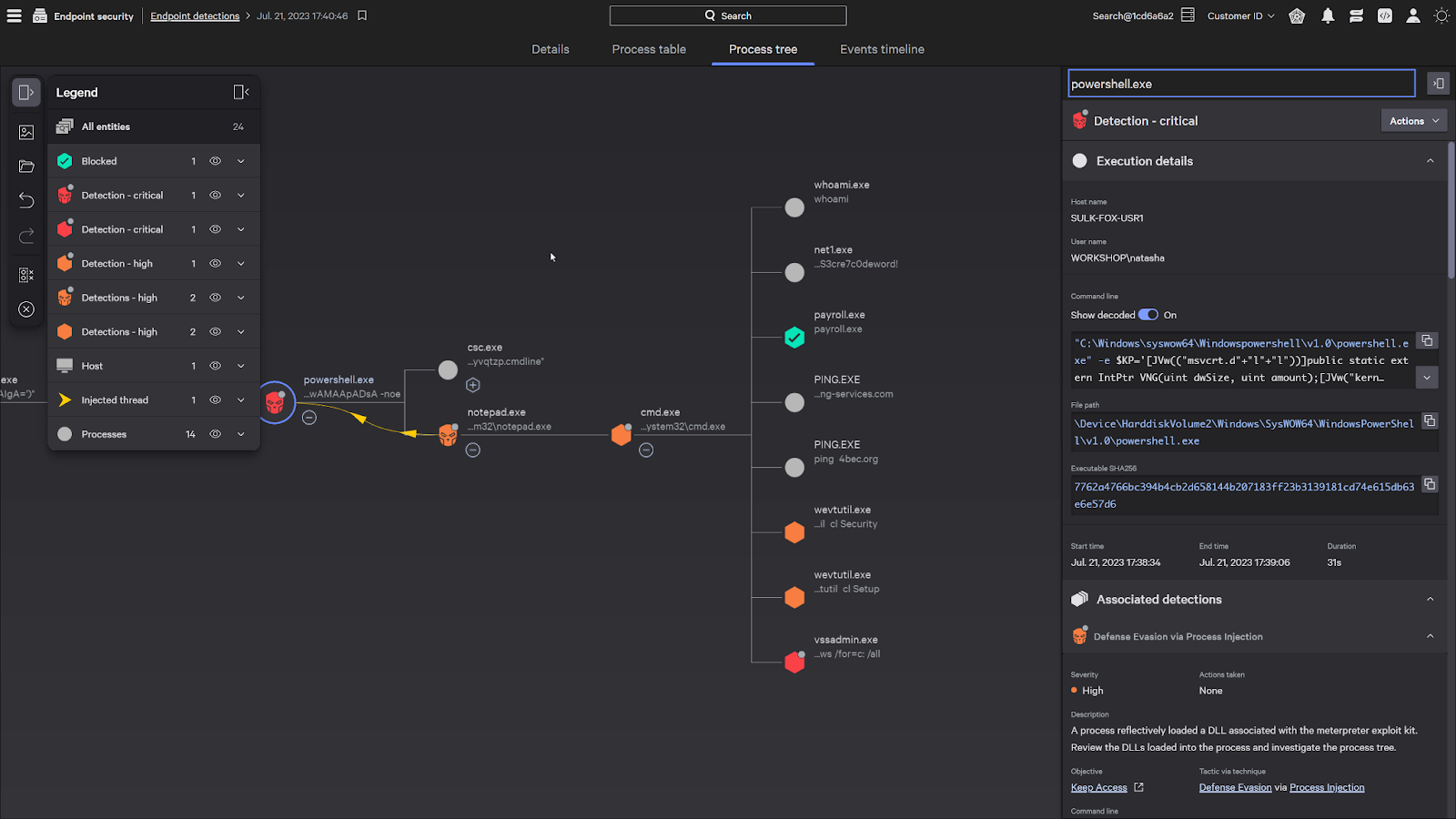
When a threat is detected, automated or 1-click response contains it and rollback reverses ransomware and unauthorized changes without reimaging. Storyline correlates every related process, file, network and identity event into one attack narrative with up to 365 days of retention, and Purple AI supports natural-language investigation. The agent deploys across SaaS, on-premises, hybrid and air-gapped environments.
Key features include:
- Behavioral AI detection: Detects suspicious and malicious activity in real time without signatures, stopping ransomware, zero-day exploits, supply chain attacks and fileless malware, and correlating endpoint, cloud workload and identity activity.
- Automated and 1-click response: Contains threats in seconds through automated or one-click actions the moment they are detected.
- Rollback: Reverses ransomware and unauthorized changes and restores endpoints to their pre-attack state without reimaging.
- Storyline correlation: Connects every related process, file, network and identity event into a single visual attack narrative, with up to 365 days of EDR context retention.
- Credential abuse and lateral movement detection: Correlates endpoint activity with identity signals to catch credential misuse, lateral movement and privilege escalation in one console.
- Purple AI investigation: Lets analysts ask questions in natural language, summarizes events and runs agentic investigations that surface evidence and recommended actions.
- Controlled deployment: Uses a single agent architected to minimize kernel interactions, with controlled update rollout, Day 0 macOS support and FedRAMP High authorization.
Limitations (as reported by users on G2):
- Exclusion and policy management at scale: Building exclusions is largely manual, with no way to preview which endpoints a change affects before it goes live.
- Query learning curve: The Deep Visibility query syntax is not intuitive for newer analysts, making threat hunting slow to hand off.
- Reporting: Canned reports rarely match regulatory or management needs, and customization options are limited.
- Console performance and stability: The portal can be slow on large queries, and users report bugs and intermittent login issues in the newer interface.
- False positives and repeat alerts: Alerts can recur after mitigation, and legitimate processes are occasionally blocked until tuned.
- macOS parity and agent footprint: macOS agent updates lag Windows, and the agent can consume noticeable CPU and RAM during scans.
- Blocklist scope: The blocklist supports file hashes only, not IP addresses, domains or URLs.

Source: SentinelOne
6. Microsoft Defender for Endpoint

Best for: Multiplatform EDR integrated with the Microsoft security stack
Strengths: Automatic attack disruption, global threat intel, Defender XDR
Things to consider: Multiple portals; complex licensing; non-Windows parity
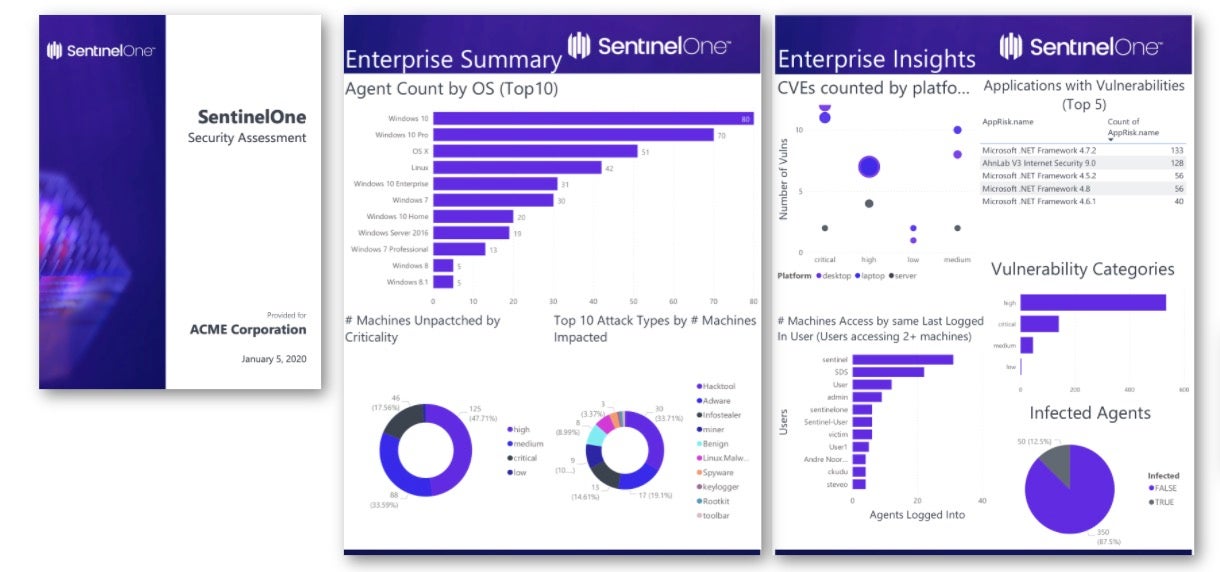
Microsoft Defender for Endpoint is a cloud-native endpoint security platform that delivers next-generation antivirus, EDR, mobile threat protection and advanced hunting across Windows, macOS, Linux, Android, iOS and IoT devices. It sits at the core of Microsoft Defender XDR, which correlates endpoint alerts with identity, email, SaaS and cloud signals.
Automatic attack disruption blocks lateral movement and remote encryption across devices in a decentralized way when a ransomware campaign is detected, with Microsoft reporting a three-minute average time to disrupt and 35,000 incidents disrupted per month. Threat intelligence draws on 84 trillion daily signals, and security settings can be managed from the Defender portal or mirrored in Intune.
Key features include:
- Automatic attack disruption: Automatically disrupts ransomware by blocking lateral movement and remote encryption across all devices in a decentralized way.
- Next-generation antivirus: Runs always-on scanning with file and process behavior monitoring and heuristics, blocks apps deemed unsafe that may not be classified as malware, and applies cloud-delivered protection for new threats.
- EDR and advanced hunting: Provides endpoint detection and response, advanced hunting queries and XDR-level alert correlation across devices, identities, email and cloud apps.
- Security Copilot investigation: Uses built-in security-specific generative AI to investigate and respond to incidents.
- Exposure management: Offers pre- and post-breach capabilities that map the attack surface and help reduce exposure risk.
- Global threat intelligence: Draws on 84 trillion daily signals and 10 thousand experts in 72 countries to inform detections.
- Flexible enterprise controls: Provides granular controls for settings, policies, web and network access, detections and automated workflows.
- Device discovery and unified management: Shows managed and unmanaged Windows, Linux, macOS, iOS, Android, IoT and network devices in one view, with settings managed from the Defender XDR portal and mirrored in Intune under customer-controlled update rollout.
Limitations (as reported by users on G2):
- Multi-portal configuration: Policies are spread across Defender, Intune, Entra and Purview, making it hard to know where to create and track them.
- Licensing complexity: Features are split across plans, some advanced response capabilities require E5 licensing, and server licensing has exceptions to catch.
- Non-Windows parity: Detection quality on macOS and Linux is reported to lag Windows, with compatibility issues on older Windows versions.
- Alert noise and false positives: Legitimate services can be flagged, and alerts often need suppression or tuning in larger environments.
- Resource usage: Scheduled scans can drive high CPU usage on older hardware.
- Support responsiveness: Several users report slow responses to service requests.
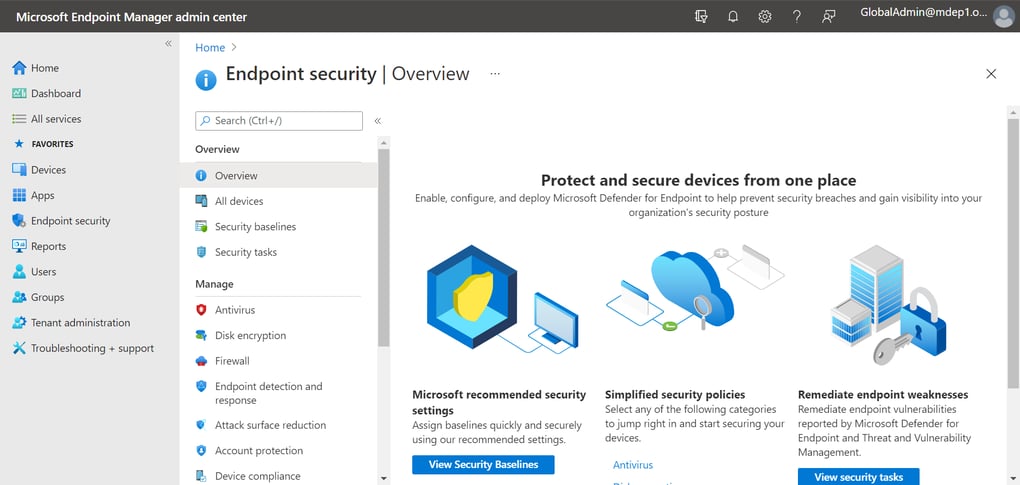
Source: Microsoft
7. Sophos Endpoint

Best for: Prevention-first endpoint protection with default-on mitigations
Strengths: CryptoGuard rollback, 60+ exploit mitigations, Adaptive Attack Protection
Things to consider: Resource use during scans; console navigation and reporting
Sophos Endpoint (Intercept X) is a unified endpoint protection and EDR agent for Windows, macOS and Linux that blocks the techniques attackers use rather than individual exploits or malware variants. More than 60 exploit mitigations are enabled by default on every running process without per-application tuning, alongside deep learning pre-execution detection and behavioral analysis.
CryptoGuard monitors file contents for malicious encryption, blocks the offending process whether it runs locally or on a compromised network device, and reverts encrypted files. Adaptive Attack Protection switches to more aggressive defenses when an active attacker is detected, and Synchronized Security shares telemetry with Sophos firewall, identity and email controls through Sophos Fusion.
Key features include:
- CryptoGuard anti-ransomware: Monitors file contents for malicious encryption, blocks the responsible process on the local machine or a compromised network-connected device, automatically reverts encrypted files and protects the Master Boot Record.
- Anti-exploitation: Applies 60+ proprietary exploit mitigations by default to every running process, blocking the techniques needed to turn a vulnerability into a compromise.
- Behavior analysis and memory scanning: Monitors process, file and registry events over time, scans memory of running processes and detects code implanted into process memory to evade detection.
- Script and AMSI inspection: Determines whether PowerShell scripts and Office macros are safe when obfuscated or generated at runtime, blocks fileless attacks loaded from memory and includes a mitigation against AMSI evasion.
- Application Lockdown: Blocks actions not normally associated with a process, such as a browser or Office application launching PowerShell.
- Adaptive Attack Protection and Critical Attack Warning: Switches to more aggressive protection when an active attacker is detected based on behavior combinations and toolkit usage, and alerts all administrators when adversarial activity appears across multiple endpoints.
- Tamper Protection: Provides kernel-level self-defense that blocks EDR killers using bring-your-own-vulnerable-driver techniques before a malicious driver can act.
- Attack surface reduction: Includes web protection, web control, category-based application control, peripheral control, DLP, download reputation and malicious traffic detection for command-and-control connections.
Limitations (as reported by users on G2):
- Resource usage: Deep scans and behavioral monitoring can cause CPU spikes on developer, CAD and older machines until exclusions are configured.
- Console navigation: Granular settings such as AMSI exemptions and server policy overrides are buried in nested menus, and the policy UI is not always intuitive.
- Reporting: Charts and reports are limited and not very customizable, and some alerts lack clear remediation guidance.
- False positives on custom scripts: Internal PowerShell scripts and unsigned executables can be flagged until explicit exclusions are created.
- Console performance and sync delays: Detailed reports and large device inventories can load slowly, and policy updates sometimes take time to sync.
- Mac removal and legacy licensing: Uninstalling from a Mac with tamper protection enabled is difficult, older operating systems move quickly into premium legacy licensing, and support responsiveness varies by region.

Source: Sophos

8. Cortex XDR

Best for: XDR combining endpoint, network, cloud and identity data
Strengths: Technique-based prevention modules, root-cause analysis, AgentiX
Things to consider: Learning curve for console and XQL; licensing complexity
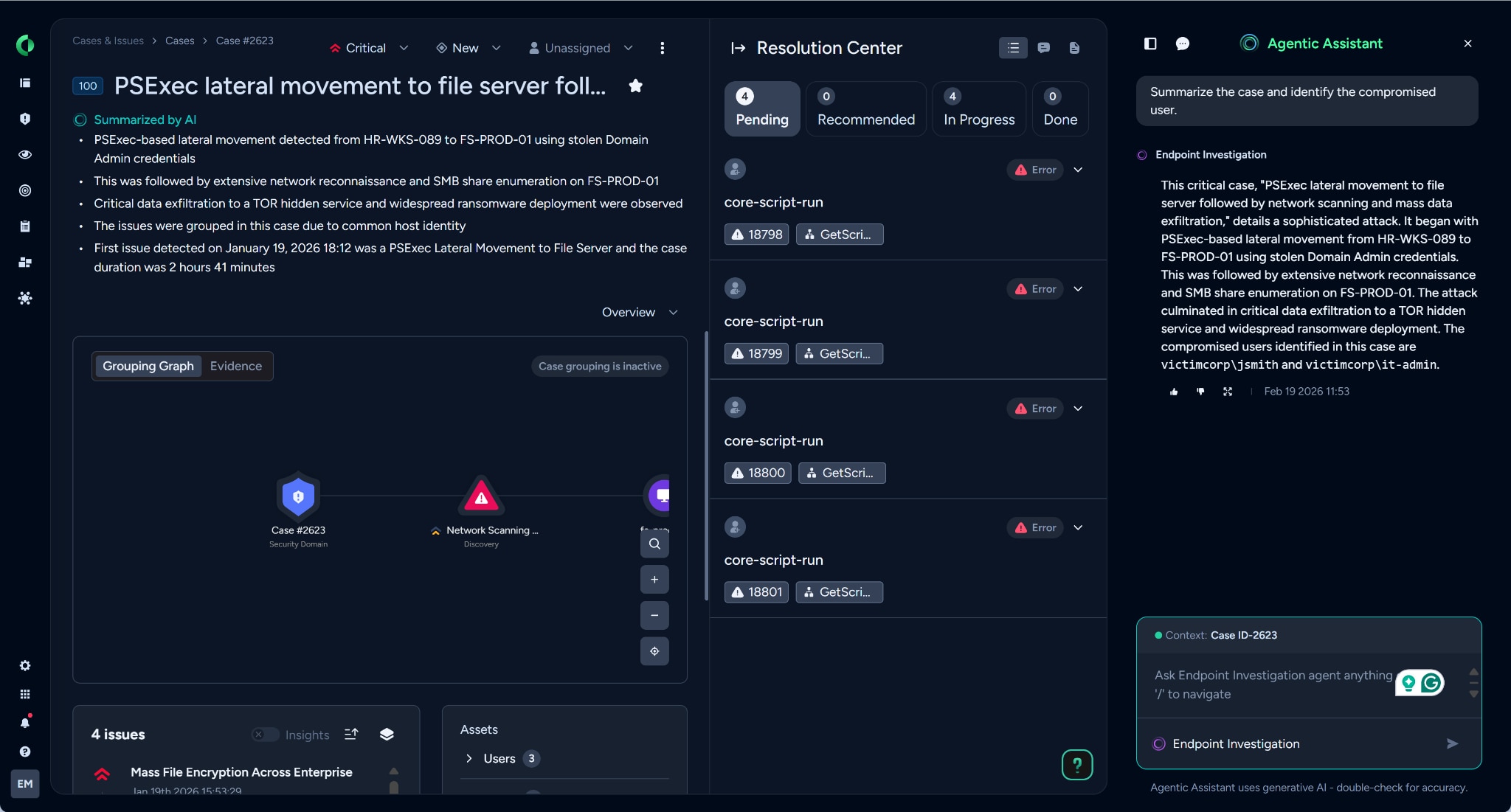
Cortex XDR from Palo Alto Networks connects data from endpoint, network, cloud, identity and email sources and applies AI to detect and prioritize attacks that span multiple vectors. Its endpoint agent includes prevention modules built for individual techniques, from zero-day exploits to fileless malware and hijacking of legitimate processes.
When an alert fires, the platform uncovers the execution path and root cause, and native automation can disrupt the attack within minutes. The Cortex AgentiX Assistant adds AI agents that investigate and respond, and the same agent extends to NG-SIEM, endpoint DLP, exposure management and cloud security on the Cortex platform. Unit 42 provides MDR, managed threat hunting and incident response inside the tenant.
Key features include:
- Technique-based prevention modules: Prevention modules tailored to stop each technique used in modern attacks, including zero-day exploits, fileless malware and hijacking of legitimate processes.
- Cross-domain AI detection: Correlates endpoint, network, cloud, identity and email data and applies AI to detect and prioritize attacks that cross multiple vectors.
- Root cause analysis: Uncovers the execution path of every alert and reconstructs attack timelines so investigations are reduced to minutes.
- Native response automation: Runs automation to disrupt attacks, with the Cortex AgentiX Assistant providing adaptive AI agents that investigate and respond at machine speed.
- Custom detection rules: Supports proactive prevention through customizable BIOCs, IOCs and Correlation Rules.
- Anti-tampering: Approved in the AV-Comparatives Anti-Tampering evaluation, protecting the agent from being disabled.
- Single data lake and platform: Unifies NG-SIEM, endpoint DLP, exposure management, email security and cloud security in one analyst experience, with a REST API for alerts and incidents and integration with Google SecOps.
- Unit 42 managed services: MDR operates natively inside the Cortex XDR tenant, with managed threat hunting, incident response and cyber risk assessments available.
Limitations (based on publicly available sources):
- Licensing and data costs: Pricing tiers and data ingestion or retention add-ons are frequently reported as expensive for smaller organizations.
- Console and XQL learning curve: The management console and XQL query language take time for new analysts to use effectively.
- Agent resource usage: Some environments report CPU and memory impact on older hardware during scans.
- Alert tuning: Initial deployments can generate noise until policies and exceptions are tuned to the environment.

Source: Palo Alto Networks
Conclusion
Advanced ransomware protection requires controls that can interrupt the attack chain before widespread encryption occurs. Organizations should evaluate products based on their ability to prevent unauthorized execution, detect script and LOLBin abuse, identify credential theft and privilege escalation, contain lateral movement, resist security tool tampering, and automatically isolate compromised endpoints. Effective protection should also combine behavioral detection with detailed investigation telemetry and resilient recovery measures to address both ransomware encryption and double-extortion attacks.